
How to Architect Secure and Cost-Effective AWS Cloud Solutions
In today’s cloud-first world, designing infrastructure that is both secure and cost-efficient is a top priority for any organization building on AWS. Whether you're launching a startup, modernizing legacy systems, or scaling enterprise workloads, getting the architecture right from the start is critical.
This article walks through a foundational AWS architecture using best practices and real-world recommendations. The goal: create a three-tier infrastructure that is scalable, secure, cost-optimized, and production-ready.
Let's walk through the process of how we'll ultimately arrive at this infrastructure design:

Starting with a Blank Slate
The best practice is to define infrastructure as code. For this example, we use AWS CloudFormation templates to standardize, automate, and simplify deployments.
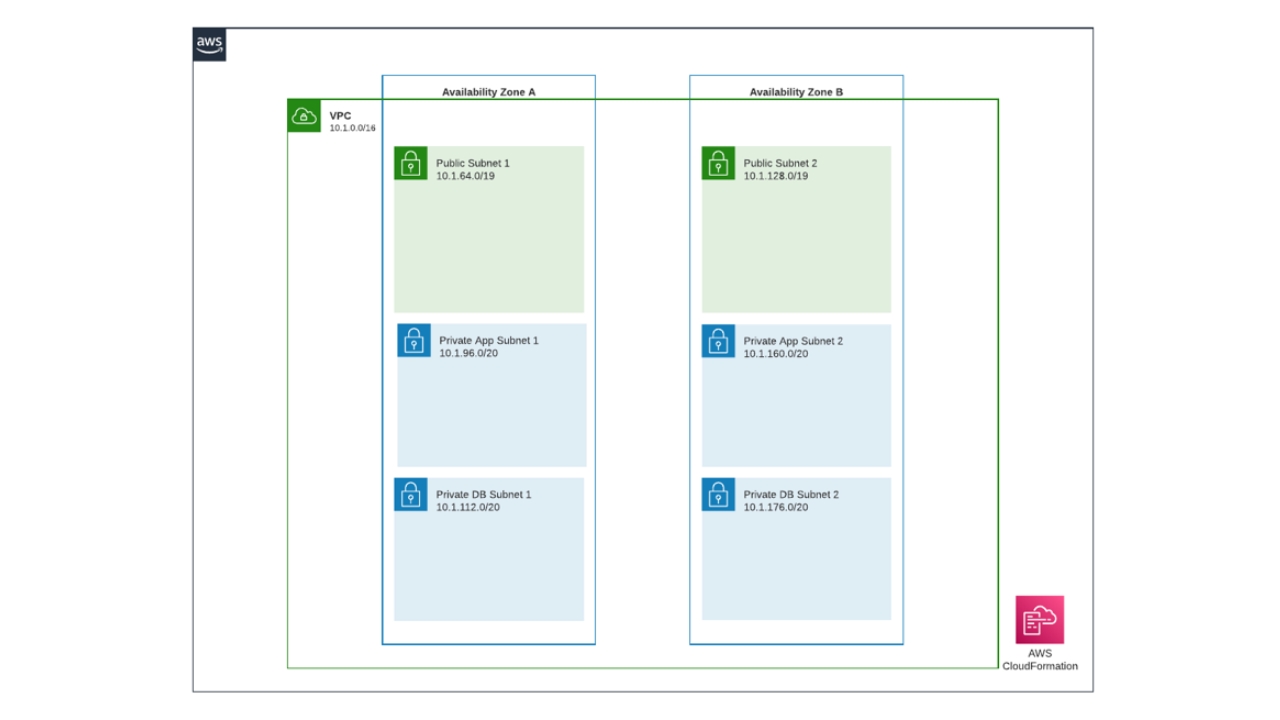
Step 1: Build the VPC
Start by creating a Virtual Private Cloud (VPC). Choose a CIDR block that doesn’t overlap with any others in your environment. This foresight prevents conflicts if you later connect multiple VPCs via peering or Transit Gateway.
Step 2: Design for High Availability
For resilience, build across at least two Availability Zones (AZs). Some AWS regions offer more than two AZs, and using more increases fault tolerance. However, it also increases cost as resources must be duplicated in each zone.
Step 3: Create Public and Private Subnets
- Public subnets are configured with an internet gateway. Instances in these subnets can receive traffic directly from the internet.
- Private subnets have no direct internet access. Resources here connect out via a NAT gateway but cannot be accessed from outside.
Step 4: Build Private Subnets
- Application Layer: Deployed in private subnets. Hosts EC2 instances or containers.
- Database Layer: Isolated in a second set of private subnets to further restrict access.
Step 5: Define Security Groups
Apply security groups that restrict inbound and outbound traffic:
- Public subnets allow limited external access (e.g., to ALBs or bastion hosts).
- Application subnets only allow traffic from the public layer.
- Database subnets only allow access from application subnets.
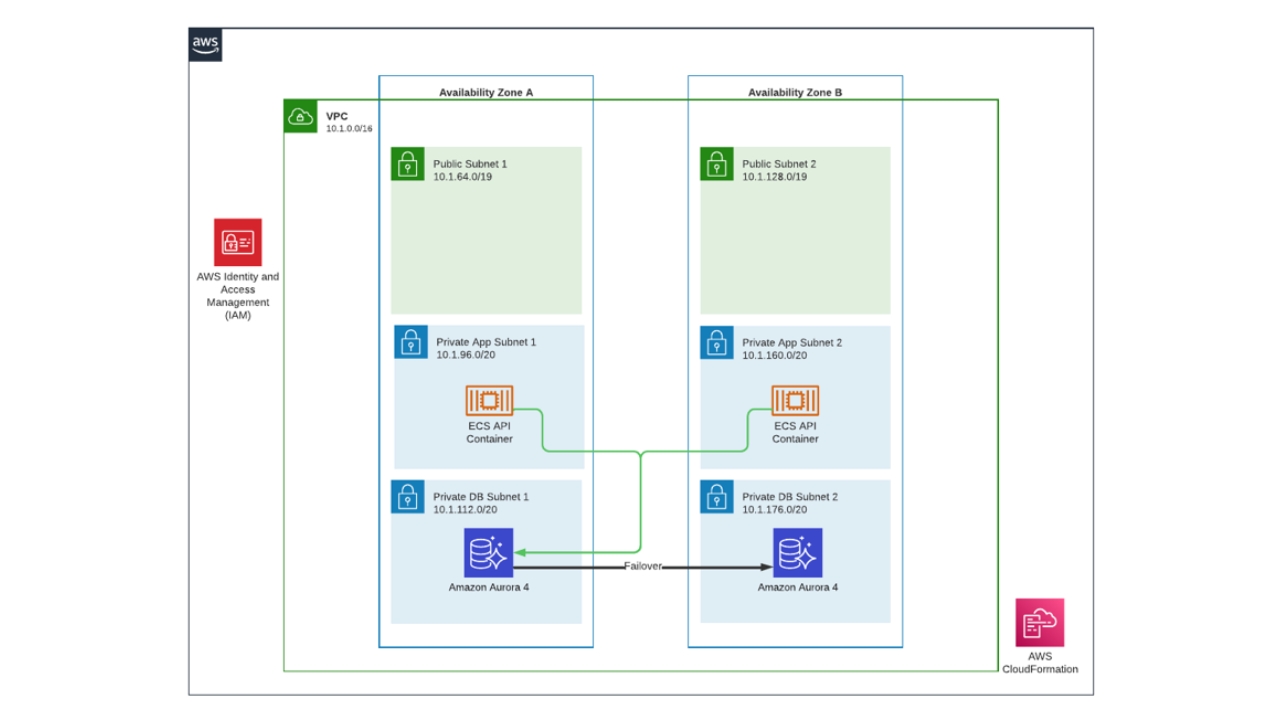
Step 6: Set IAM Roles for Fine-Grained Permissions
Define IAM roles to grant services like EC2, Lambda, or ECS tasks access only to what they need. Principle of least privilege is essential.
Step 7: Deploy the Application
In this example, the application runs in containers on AWS Elastic Container Service (ECS). ECS simplifies orchestration and supports both EC2 and Fargate launch types.
Step 8: Launch a Database Instance
Our diagram example includes Aurora in one of the database instances. Aurora provides a fully managed, high-performance relational database. It automatically creates a failover replica in a separate AZ to ensure high availability. You can also create read replicas to offload query loads from the primary database.
Step 9: Use an Application Load Balancer (ALB)
An ALB distributes incoming traffic across containers or instances. You can register a custom domain via Route 53 to mask the ALB’s DNS name. While the ALB can scale across AZs, its built-in security is limited.
Step 10: Improve Performance with CloudFront as a CDN
Placing a CloudFront distribution in front of your ALB:
- Adds a global edge caching layer
- Introduces additional security controls
- Enables offloading static assets to Amazon S3
- Caches files in CloudFront, improving load time and reducing traffic to the backend
Step 11: Configure Monitoring and Alerts
Use CloudWatch Alarms to monitor application health and usage. Push alerts via Amazon SNS to receive notifications by email or SMS.
Step 12: Protect with AWS WAF and Bot Control
Deploy AWS Web Application Firewall (WAF) to filter traffic and block known attack vectors. For additional protection against bots, integrate AWS Bot Control.
For critical applications, AWS Shield Advanced offers premium DDoS protection and access to a dedicated response team during an attack—though this service comes at a higher cost.
Step 13: Lock Down the ALB with CloudFront VPC Origins
AWS CloudFront VPC Origins allows us to move the ALB to a private subnet. This makes the ALB internal-only, closing an external access point and improving security. This means your ALB no longer needs to be public, greatly reducing its exposure.

Step 14: Skip the Bastion Host – Use Session Manager
Instead of using a bastion host, enable AWS Systems Manager Session Manager. It lets you securely access EC2 instances without SSH or opening ports. It requires that the instance runs the SSM agent, which is included in most standard AMIs.
Step 15: Secure S3 Data Transfers with VPC Endpoints
By default, data sent to S3 traverses the public internet, adding latency and exposing data to risk. Instead, create a VPC endpoint for S3 to transfer data over AWS’s internal network—boosting both security and performance.

Step 16: Manage Secrets Securely
Use AWS Secrets Manager to store sensitive credentials, such as database passwords or API keys, instead of hardcoding them in your codebase or storing them on servers. Applications can securely retrieve secrets at runtime.
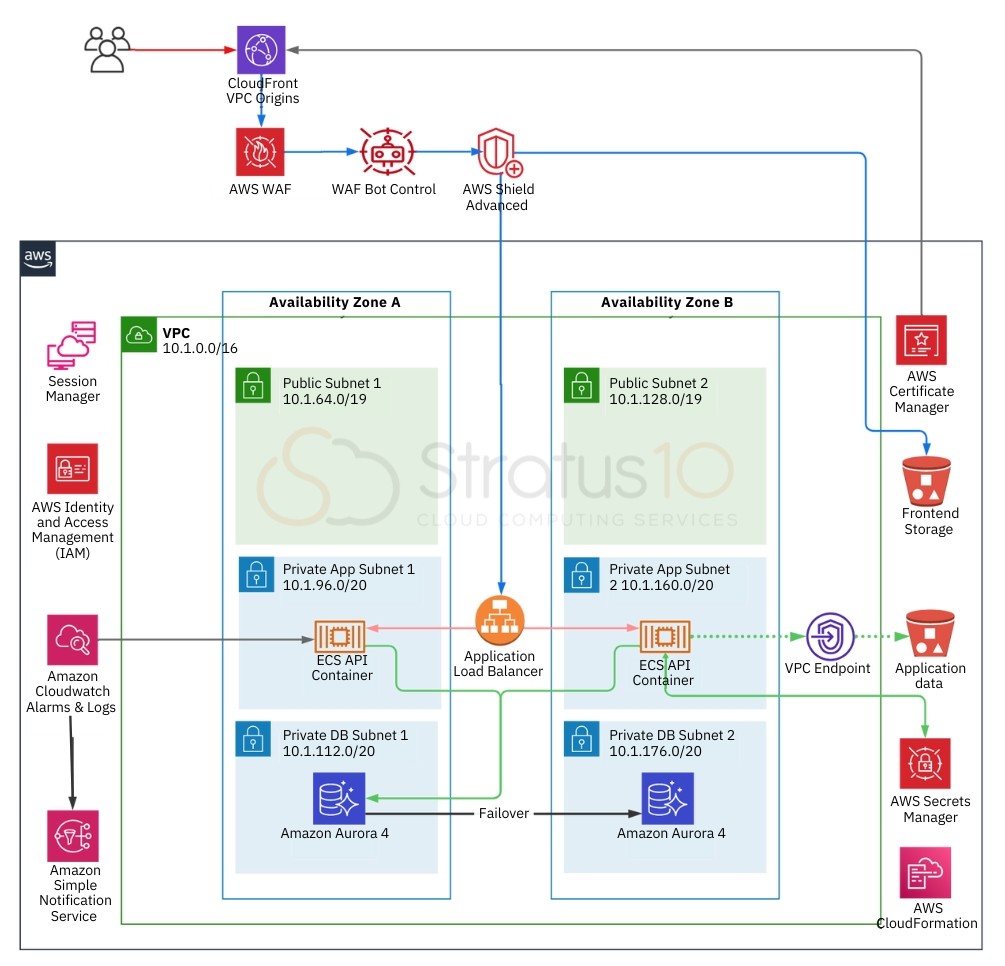
The following diagram shows our complete three-tier infrastructure setup. Of course, things get much more intricate and complex from here, but this establishes a basic foundation that can be easily adapated.
Beyond the Basics: Tools for Optimization
To continuously improve your AWS environment, Stratus10 provides several complimentary offerings:
- AWS Immersion Days: Tailored workshops co-hosted with AWS, providing hands-on training on services like Lambda, ECS, VPC design and more.
- Well-Architected Reviews: In-depth evaluations of your workloads based on AWS’s six pillars.
- Cost & Security Compliance Assessment: Delivered through Kalos, Stratus10’s cloud visibility platform, you'll receive recommendations for cost savings, risk reduction, and performance improvement.
Why Cloud Architecture Design Services Matter for AWS Projects
As cloud adoption accelerates and operating on the cloud becomes the default, the need for robust, scalable, and secure infrastructure is a non-negotiable. Cloud architecture design services provide the strategic framework and hands-on expertise to ensure that every workload, resource, and policy is aligned with AWS best practices. These services help teams avoid costly missteps, optimize performance, and maintain compliance with security standards.
With AWS's growing ecosystem of services, it’s easy to over-engineer or under-utilize components. Cloud architecture design services guide teams through making the right choices—from selecting the proper compute and storage options to configuring high availability and network security. For organizations with limited in-house cloud experience, these services can dramatically reduce time to market and mitigate risk.
Conclusion
This foundational AWS architecture balances security, performance, and cost. While real-world environments often require customizations, these principles help ensure your infrastructure is scalable and resilient from day one.
For guidance tailored to your workloads, contact Stratus10 or explore our offerings on the AWS Marketplace.
Follow Stratus10's CEO on LinkedIn to stay current with AWS best practices and insights from a trusted AWS Advanced Consulting Partner.
Recent Posts





Whiteboarding Session: Architecting a Basic AWS Solution from Scratch
Whiteboarding Session: Architecting a Basic AWS Solution from Scratch
FAQs
Starting with a clean slate allows teams to implement best practices from the beginning—ensuring efficient networking, properly scoped permissions, strong security boundaries, and infrastructure that scales smoothly with business growth.
By leveraging a variety of AWS tools based on a company's specific applications and business needs as well as conducting regular Well-Architected Reviews, architecture services identify inefficiencies and recommend changes that reduce unnecessary spend.
Cloud architecture design services help organizations plan and build secure, scalable, and cost-effective infrastructure in the cloud. These services include infrastructure planning, automation through infrastructure as code, security configuration, performance optimization, and more.
Stratus10's team of certified AWS professionals and solutions architects focus on aligning cloud architecture with business goals while ensuring scalability, cost-efficiency, and compliance. Our team also provides expert-led AWS Immersion Day trainings, well-architected reviews, free infrastructure assessments, and ongoing support through Kalos, a cloud visibility platform.
Have questions about your infrastructure? We'll help you assess your existing set-up and identify optimization opportunities.
Request a complimentary consultation with one of our certified engineers.