
How to Architect Amazon Bedrock Knowledge Base Ingestion Pipelines
Best practices for S3 ingestion, Redshift access, multimodal content, and retrieval at scale
Many Amazon Bedrock implementations start with what looks like a straightforward goal: connect structured and unstructured data sources, make them accessible to a foundation model, and enable natural language interaction. What becomes clear very quickly is that the quality, reliability, and cost of the solution depend heavily on decisions made at the data layer (not in the model or prompt design).
Across multiple Bedrock Knowledge Base deployments, we’ve seen the same pattern emerge, where success depends on how data is organized, where it lives, and how it moves through ingestion pipelines.
This article walks through the architectural decisions, service boundaries, and automations that shape a production-ready Bedrock system using document ingestion pipelines for large-scale datasets in Amazon S3 and structured-data access through Redshift.
The opportunity and complexity of Amazon Bedrock
Amazon Bedrock is one of AWS’s most important services for GenAI. It gives organizations managed access to a broad selection of leading foundation models, along with capabilities for building knowledge bases, processing multimodal data, applying guardrails, evaluating models, and developing agents. We are strong proponents of Bedrock because it makes sophisticated GenAI use cases more accessible within the AWS environment, from grounding applications in company data to automating complex workflows, without requiring teams to deploy and manage the underlying model infrastructure.
The managed experience can make an initial implementation appear deceptively simple. Accessing a foundation model is relatively straightforward, but building a reliable system around company data requires careful architectural decisions. Data location, structure, parsing, chunking, ingestion, retrieval, quotas, throughput, and cost can all affect the result. These considerations are not unique shortcomings of Bedrock. They are engineering realities that emerge as GenAI applications become more sophisticated and operate at greater scale.
In our experience, the most consequential decisions occur at the data layer, which is where the following sections focus.
The data-layer challenges behind Bedrock implementations
Model selection matters, but it should be informed by the data and retrieval architecture rather than treated as the starting point. In our experience, teams that evaluate models before defining what data the system needs, how that data will be scoped and organized, and how it will move through ingestion and retrieval are putting the cart before the horse. Those foundational decisions determine the quality, speed, cost, and reliability of the system and provide the requirements needed to select the right model.
When the data you want to ingest already lives in S3 or Redshift, it’s easy to assume that data access won’t be a problem. IAM roles exist; Bedrock just needs permissions. In practice, that assumption breaks down quickly once you have more than a small dataset.
Data challenge 1: data locality
A common initial approach is to centralize Bedrock in a single AWS account and connect to data sources across accounts. While S3 can often be accessed cross-account, Bedrock Knowledge Base integrations with structured systems like Redshift have their own query-engine, authentication, networking, and permission requirements. Depending on the architecture, these requirements may call for data replication, pipelines, or service-layer mediation rather than direct cross-account querying.
If these constraints aren’t accounted for early, teams often discover them only after committing to architectures that cannot operate reliably. In many implementations, co-locating the Bedrock Knowledge Base with Redshift simplifies access and reduces operational complexity.
Data challenge 2: data structure
Treating “data” as a single category leads to designs that break as soon as volume or format diversity increases. Structured data in Redshift behaves very differently from unstructured documents in S3. Images and PDFs in S3 introduce another set of constraints entirely. Bedrock treats formats differently, uses different ingestion paths, and enforces different limits. In the case of images, you need a supported multimodal parsing or embedding approach, such as Bedrock Data Automation, a foundation model parser, or a multimodal embedding model, depending on the content and retrieval design.
Data challenge 3: data ingestion
A common false assumption is that an existing S3 bucket represents a clean dataset, but that’s rarely the case. Data needs to be cleaned and organized before ingesting. And whenever there’s a high volume of data, you run into ingestion limits and operational boundaries that require engineering workarounds.
Ingestion issues are multifaceted, so the following sections will break down how Bedrock is designed to ingest data, limits to understand, and how to structure data properly for ingestion.
Choosing the right Bedrock Knowledge Base ingestion path
Connecting a data source to Bedrock is straightforward, but the appropriate ingestion path depends on the source, scale, content types, retrieval requirements, and level of control the application needs. Reference architectures often abstract these decisions behind a single arrow labeled “data sources,” while implementation requires teams to choose among several distinct approaches.
There are three primary ways to add or update documents in a vector-based Bedrock Knowledge Base:
- Using Knowledge Base sync jobs - ingestion from a configured data source such as Amazon S3
- Using the direct document ingestion API - programmatically submitting documents in controlled batches
- Using Amazon Bedrock Managed Knowledge Base - a fully managed RAG service (released June 2026) that connects to S3, SharePoint, Confluence, Google Drive, OneDrive, or the public web, and handles parsing, chunking, and embeddings internally with no separate vector store to provision.
- If your data is available through its supported connectors, Managed Knowledge Base can provide a faster path to a managed RAG implementation by handling storage, indexing, and retrieval infrastructure. The tradeoff is less direct control over parts of the ingestion and retrieval architecture than with a vector-based Knowledge Base that uses a separately configured vector store.
- If your architecture includes structured data such as Redshift, or requires greater control over parsing, chunking, embeddings, or vector storage, the sync-job and direct-ingestion approaches covered in the rest of this article remain relevant.
- If your data is available through its supported connectors, Managed Knowledge Base can provide a faster path to a managed RAG implementation by handling storage, indexing, and retrieval infrastructure. The tradeoff is less direct control over parts of the ingestion and retrieval architecture than with a vector-based Knowledge Base that uses a separately configured vector store.
When Bedrock syncs data from a configured S3 URI, it processes supported, accessible objects within the configured bucket or inclusion prefix. In most real environments, S3 buckets contain a mix of relevant documents, images, exports, temporary files, and historical artifacts, not all of which are intended to be queried by a model.
Irrelevant ingested content creates issues, mainly degraded response quality, but it also increases downstream costs. Embedding generation, multimodal parsing, and storage all incur charges, and irrelevant data increases token usage during retrieval and response generation. Debugging becomes difficult when the model references documents that should never have been included in the first place.
Issues compound with scale. S3 can readily support large datasets, but ingestion, parsing, indexing, change tracking, and recovery become more difficult to coordinate as the dataset grows from hundreds to thousands or tens of thousands of files.
The following sections look more closely at common data challenges and how to address them.
The role of vector databases in Bedrock architectures
Many Bedrock systems use RAG (Retrieval-Augmented Generation), the architectural pattern where a model retrieves relevant context from external data before generating a response. In Bedrock, Knowledge Bases provide a managed implementation of this pattern, but the underlying mechanics remain the same: your data is indexed, retrieved, and supplied to the model at runtime.
Vector-based RAG systems also require a vector store to support semantic search over ingested documents. Vector databases store embeddings of document chunks, enable similarity search, and determine what context the model receives.
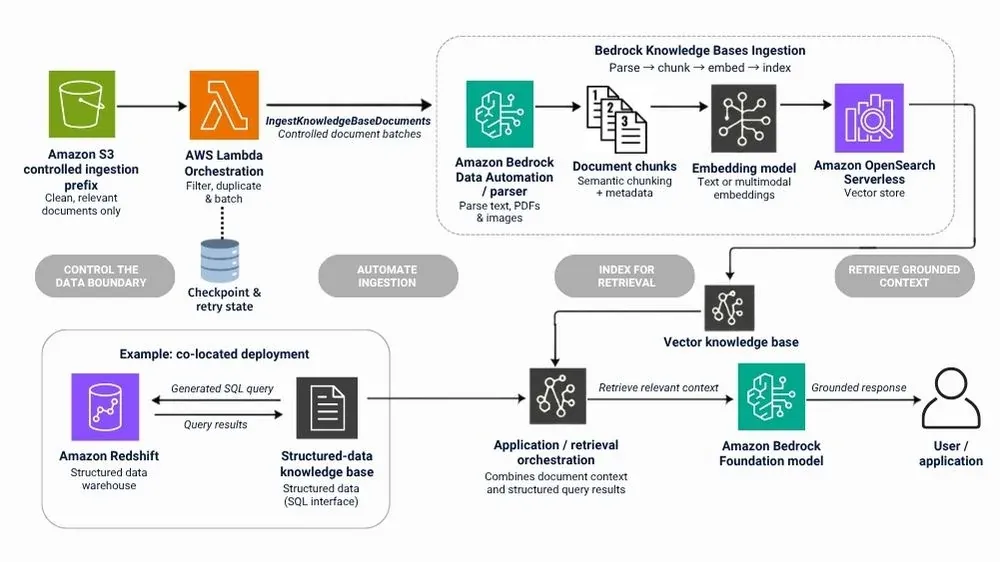
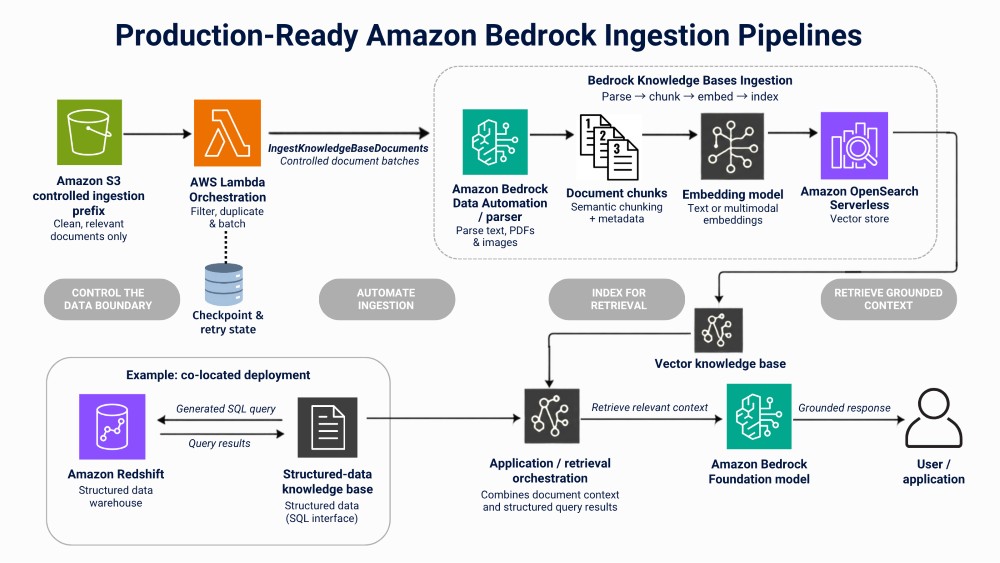
Unstructured documents in S3 are typically parsed, chunked, transformed into embeddings, and indexed for similarity search. A Knowledge Base connected to structured data follows a different path: Amazon Redshift serves as the query engine, and Bedrock converts natural-language requests into SQL to retrieve relevant records. Structured Redshift data does not pass through the same chunking and embedding pipeline as S3 documents.
Common Bedrock-compatible vector storage options include Amazon OpenSearch Serverless, Aurora PostgreSQL with pgvector, and third-party managed vector stores.
Best practices to ensure retrieval quality:
- Chunk strategically
Chunk by semantic boundaries (headings, sections), not fixed character counts alone.
- Avoid over-chunking
Too small: loss of context. Too large: token waste and retrieval dilution.
- Store metadata
Including source, timestamp, document type, and access level. Metadata filtering reduces irrelevant retrieval by narrowing search results. It’s also important to re-index selectively rather than rebuilding the entire index for minor updates, tracking, and updating only documents that have changed.
A well-designed vector layer helps determine whether your Bedrock system returns relevant answers or amplifies noise, making retrieval quality the single biggest factor in overall system performance.
>> Read the Peachjar GenAI Bedrock case study.
Solutions to Bedrock Data Challenges
The data challenges outlined above are interconnected, but each requires a distinct architectural response. The following practices address data locality, data structure, and ingestion by focusing on how S3 content is organized, where structured data is accessed, how multimodal files are processed, and how ingestion is automated at scale.
S3 data organization strategy (data locality)
Bedrock treats the configured S3 location as a raw input source. If an object is accessible, supported, and within the configured bucket or inclusion prefix, it is ingested during synchronization. This can potentially pollute the model’s context, increase parsing costs, and make outputs harder to reason about. Here’s how we recommend organizing your data for clean, reliable, and sustainable ingestion.
Best practices for your Bedrock S3 strategy:
- Organize data for ingestion
Normalize and organize clean data to establish a single source of truth.
- Create an S3 prefix
Because Bedrock can ingest data from an S3 prefix, we recommend using a prefix in an existing folder. Just create a dedicated prefix within the existing bucket that contains only the objects intended for ingestion, then configure the Knowledge Base data source to use that prefix.
- Make application-level changes
Ensure relevant files are written to the S3 prefix so they can be used for ingestion.
Ultimately, it’s important to treat your S3 prefix (or bucket) as a controlled interface, and not general purpose storage. Ingestion requires both a one-time setup (for all past data) and a continuous ingestion pipeline (for new, replaced, and updated files), so be sure to maintain data integrity. Poorly controlled ingestion can degrade retrieval quality and require cleanup, deletion, or re-indexing to correct.
Another S3 Ingestion Option: Create a Duplicate S3 Bucket
While we highly recommend the above S3 prefix method, it’s not the only way. We’ve encountered situations where we needed to create a duplicate S3 bucket with only the files intended for ingestion. Then, we make application-level changes to ensure files are written to two destinations: one bucket for operational or public use, and a second bucket dedicated to Bedrock ingestion. The benefit is predictable ingestion with clear data boundaries, but the duplicated objects add storage and replication costs.
Redshift constraints and how to rearchitect around them (data locality)
In architectures where the selected Redshift integration cannot access the required data cross-account, the design may need to shift so that the Bedrock Knowledge Base lives in the same account as the structured data it depends on.
This changes the design from platform-first to data-first. Co-locating the Bedrock Knowledge Base in the account that hosts Redshift can simplify access but introduces new considerations. The Bedrock Knowledge Base is now tied to a specific account boundary, which affects how unstructured data, permissions, and future expansion are handled.
This highlights an important principle: Bedrock does not eliminate data gravity. Models may be managed services, but data boundaries still dictate where Bedrock can operate. Account structure and service-level constraints matter.
Multimodal data limits (data structure)
Text-based ingestion is relatively forgiving and straightforward. Images and PDFs are not.
When ingestion includes images, you need a supported multimodal parser, multimodal embedding model, or preprocessing pipeline to extract text and meaning for retrieval. These approaches can impose stricter limits and narrower tooling options in Bedrock.
Multimodal data also amplifies scale problems. Files are larger, processing is more expensive, and ingestion limits are reached faster. In particular, Bedrock Knowledge Base S3 sync jobs are subject to parser-specific file and job limits when working with multimodal data.
For ingesting parsed images beyond the native workflow’s quotas or orchestration capabilities, custom automation may be necessary. A Lambda function scheduled at set intervals (ex. every 12 hours or every 5 minutes) compares indexed documents against S3 objects and ingests only new or changed files. The direct ingestion API accepts documents in small batches; the current Bedrock User Guide documents up to 25 documents per API request.
The pipeline uses batching, checkpointing, and idempotent design to avoid duplication and ensure reliability.
The 1,000-file Bedrock Data Automation ceiling (data ingestion)
When using Bedrock Data Automation to parse multimodal files, Bedrock Knowledge Bases imposes a maximum of 1,000 files per ingestion job, which is a significant constraint at scale. Other multimodal approaches have different limits; for example, AWS currently documents up to 15,000 files per ingestion job for Nova Multimodal Embeddings.
One possible workaround is prefix-based ingestion: grouping files into folders of 1,000 and creating a sync job per prefix. Although workable, this approach can become operationally cumbersome. Tens of thousands of files require dozens of jobs, and continuous updates require constant coordination.
Direct API ingestion provides another option. This method limits each request to a small document batch but provides predictable behavior. The current Bedrock User Guide documents a maximum of 25 documents per API request. With appropriate batching, retries, and progress tracking, you can use the API to efficiently handle large historical loads and continuous updates. It supports one-time ingestion of tens or hundreds of thousands of files and enables continuous ingestion as new files are uploaded. New uploads get automatically processed as scheduled, whether that’s near real-time, every 12 hours, or other intervals.
At scale, the trade-off is clear. API-based ingestion requires custom automation, but it avoids turning ingestion into a job orchestration problem.
>> Learn about managing large datasets on AWS with S3, Athena, and Glue.
Designing ingestion as infrastructure (data ingestion)
Once ingestion moves to the API path, it must be treated as infrastructure.
Bulk ingestion of historical data and continuous ingestion of new uploads are different workloads and should be designed separately. Bulk ingestion prioritizes controlled throughput and resumability. Continuous ingestion prioritizes reliability and scheduled or near-real-time processing.
Event-driven automation, often triggered by S3 events, allows new files to be ingested automatically within minutes. Idempotent design ensures retries do not corrupt state. Observability turns ingestion from a black box into a dependable system.
Both scheduled and event-driven data ingestion are viable methods, so choose what best fits your data and model.
Planning a complex Bedrock implementation? Talk to a Stratus10 AI expert about architecture, implementation, and available AWS funding.
Cost follows architecture
The primary costs in a Bedrock system come from embedding generation, multimodal preprocessing, storage, and inference.
In practice, multimodal extraction and unnecessary ingestion can be significant cost drivers.
- Every document ingested into a vector-based Knowledge Base generates embeddings.
- Every image or scanned PDF parsed through a multimodal model adds compute cost.
- Every irrelevant file indexed increases long-term retrieval overhead and token usage during inference.
Embedding cost is directly tied to chunking strategy.
- Smaller chunks improve recall but increase the number of embeddings generated.
- Overlapping chunks multiply embedding volume.
- Re-indexing unchanged files repeats that cost.
On the inference side, costs are mainly a consequence of ingestion decisions and scale with prompt length, retrieved context size, model context window, and output length. Large context windows combined with excessive retrieval inflate token consumption quickly.
Cost optimization happens at the data boundary. Best ways to control costs:
- Pre-filter aggressively before ingestion.
- Remove boilerplate.
- Deduplicate documents.
- Avoid re-indexing unchanged files (use checksums or object versioning).
- Tune chunk size based on retrieval quality rather than arbitrary defaults.
- Limit retrieval to the top-K most relevant chunks.
If ingestion boundaries are poorly defined, cost optimization becomes reactive and expensive. Cost control in Bedrock requires both disciplined data engineering and deliberate choices about models, retrieval, context size, and inference behavior.
Conclusion: durable Bedrock systems are efficient data engineering systems
By the time Bedrock answers a question, most outcomes are already determined. Data layout, ingestion design, retrieval configuration, automation, and architectural boundaries define the requirements that then guide prompt design and model selection.
Successful Bedrock systems look less like AI experiments and more like well-designed data platforms with GenAI capabilities built on top. The teams that set clean ingestion boundaries early are better positioned to keep both performance and spend predictable.
Plan, Fund, and Build Your Next AI Initiative on AWS
AI readiness starts with modern cloud and data foundations, but its impact extends across the business. Stratus10 helps organizations modernize their AWS environments, identify high-value AI opportunities, and pursue available AWS funding to reduce the upfront cost of a proof of concept.
Recent Posts





Whether you are defining an AI roadmap or need help with a specific Amazon Bedrock implementation, tell us what you are working on. Our team will respond within 24 hours.